ESQL programming language is being used in WebSphere message broker and IBM integration bus. . You will become basic hand-on ESQL after reading the article.
ESQL stands for Extended SQL. This is WBI Message Broker Transformation Language comprises following features.
–SQL that supports message transformation
–Quickly and easily code complex transformations
–Suited for manipulating Message and Database data
–Allows selects, sub-selects and joins
-ESQL can be used in the following nodes to modify or customize their behavior
–Compute Node
–Database Node
–Filter Node
-ESQL is held in a separate file
–File stored in a file system or a shared repository .
–ESQL can be shared across nodes and flows
–Enables re use of functions
–Resides in a message flow project
–Syntactically and semantically driven code assist.
–Gives options to assist in development.
ESQL includes the following components
–Data types
–Variables
–Field references
–Operators
–Statements
–Functions
–Procedures
–Modules
ESQL supports six data types
–Boolean
–Reference
–Null
–Numeric
–Date time
–String
ESQL Boolean and Reference Data Type
–TRUE
–FALSE
–UNKNOWN
SET OutputRoot.MRM.BooleanElement1 = true;
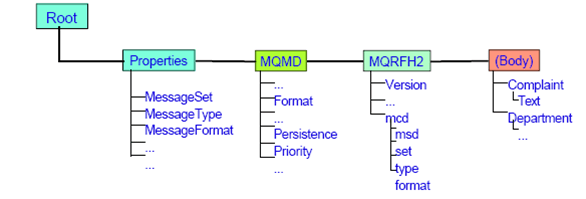
The REFERENCE data type holds the location of a field in a message or the location of a declared scalar variable.A reference literal is an hierarchic path name consisting of a list of path elements separated by periods.
InputRoot.MQMD.Priority
ESQL Date time Data Types
- ESQL DATE data type: The DATE data type holds the calendar date (year, month, and day).
- The format of a DATE literal is the word DATE followed by space, followed by a date in single quotation marks in the form ’yyyy-mm-dd’.
DECLARE MyDate DATE;
SET MyDate = DATE ’2000-02-29’;
- ESQL TIME data type : The TIME data type holds a time of day in hours, minutes, seconds, and fractions of a second.
The format of a TIME literal is the word TIME followed by a space, followed by a time in single quotation marks in the form ’hh:mm:ss.ffffff
DECLARE MyTime TIME;
SET MyTime = TIME ’11:49:23.656’;
ESQL Numeric Data Types
- The Numeric data types are
–ESQL DECIMAL
–ESQL FLOAT
–ESQL INTEGER
- DECIMAL data type holds an exact representation of a decimal number. The minimum precision of 1 and maximum precision of 31.
- FLOAT data type holds a 64-bit exponent approximation of a real number. Float literals are defined using scientific notation.
- INTEGER data type holds an integer number in 64-bit 2’s complement form. This gives a range of values between -9223372036854775808 and +9223372036854775807.
- DECIMAL: 12345678.11112222
- FLOAT: 6.6260755e-3
- INTEGER: 0x1234abcd (Hexadecimal notation)
ESQL Variables
- An ESQL variable is a local temporary field used to help process a message.
- A variable must be declared and its type must be stated before it can be used.
- A variable’s data type is fixed. If ESQL is coded that assigns a value of a different type, either an implicit cast to the data type of the target is implemented or an exception is raised.
DECLARE VAR1 INTEGER 100;
DECLARE Index INTEGER;
SET Index = 1;
Index = Index + 1;
IF Index = 1 THEN
DO;
— more ESQL –
END IF;
IF VAR1 = 100 THEN
DO;
SET VAR1 = VAR1 + Index;
END IF;
Field References
- Correlation names are used in field references/pointers to describe standard parts of the tree.
- Some of the Correlation names are:-
–Root
–Body
–Destination List
–Properties
–Exception List
–Environment
–Local Environment
- Environment tree: An Environment tree can be used to store variables (data) and to pass the variables from one node to another in a message flow.
- SET Environment.Variables.MyVariable = 1;
- LocalEnvironment: used to store variables and to define destinations where a message can be sent.
- ExceptionList tree: Contains one or more exception descriptions. An empty ExceptionList tree is created when a message is received by the input node and parsed. It is populated when an exception occurs.
- To refer to fields with periods or spaces in their names, we must use double quotes around the reference.
Body.Message.”Companies on WallStreet”.”mycompany.com”
- To refer to fields that contain double quotes, you must use two sets of double quotes around the reference
Body.Message.””hello””.
- To refer fields that have the same name as an ESQL keyword we must use double quotes around the reference.
Body.Message.“Set”.
- Deleting elements in the reverse order.
- Accessing the last element of an array.
SET OutputRoot.XML.e_PersonName[4] = NULL;
SET OutputRoot.XML.e_PersonName[1] = NULL;
Body.Invoice.”Item”[Last]
ESQL Operators
- An ESQL operator is a character or symbol that we can use in expressions to specify relationships between fields or values.
- Comparison Operators to compare one value to another < ,>, >=, <=, =
- ESQL Logical Operators
–AND Operator
–OR Operator
–NOT Operator
- ESQL numeric operators
–Unary operator
–Operator +
–Operator –
–Operator /
–Operator || :–The result is the concatenation of the two operands. We can concatenate string values (CHARACTER, BIT, and BLOB).
IN: The operator IN allows you to test whether a value is equal to one of a list of values.Operand1 IN operand2;
‘A’ IN (1,’ABC’,123.4,’A’)
- LIKE: The operator LIKE searches for strings that match a certain pattern.
Body.Trade.Company LIKE ’I%’
Body.Trade.Company LIKE ’I_’
- BETWEEN : The operator BETWEEN allows you to test whether a value lies between two boundary values.
(source >= boundary1 AND source<=boundary2)
OR
(source >= boundary2 AND source <=boundary1)
Return Values: TRUE ,FALSE , UNKNOWN
ESQL Statements
- Statements: ESQL statements always start with a keyword and end with a semicolon.
DECLARE J INTEGER;
SET OutputRoot.XML.Customer.LastName = ‘Johnson’;
CREATE FIELD OutputRoot.XML.Customer.Data;
- The DELETE statement deletes rows from a table in an external database based on a search condition.
DELETE FROM Database.SHAREHOLDINGS AS H
WHERE H.ACCOUNTNO = Body.AccountNumber;
- The INSERT statement adds a new row to an external database.
INSERT INTO Database.TABLE1(A, B, C)
VALUES (Body.A.B, Body.A.C, Body.A.D);
- PASSTHRU can be used as statement or function.
- First parameter must be database statement.
- Storing into an array :-
SET OutputRoot.XML.Result.Data[] =
PASSTHRU(‘SELECT * FROM user1.stocktable’);
- Use of ‘ ? ‘ mark..
SET OutputRoot.XML.Result.Data=
PASSTHRU(‘SELECT AccountNum FROM
user2.AccountData WHERE AccountId = ?’,
InputBody.Data.Account.Id);
- PROPAGATE
- The PROPAGATE statement propagates the input message to the downstream nodes within the message flow.
DECLARE i INTEGER 1;
WHILE i <=
CARDINALITY(InputRoot.XML.Invoice.Purchases.”Item”[]) DO
SET OutputRoot = InputRoot;
SET OutputRoot.XML = NULL;
SET OutputRoot.XML.BookSold.”Item” =
InputRoot.XML.Invoice.Purchases.”Item”[i];
PROPAGATE;
SET i = i+1;
END WHILE;
- EVAL : EVAL takes one parameter in the form of an expression, evaluates this expression, and casts the resulting value to a character string if it is not one already.
- The real power of EVAL is that it allows you to dynamically construct ESQL statements or expressions. In the examples below , the value of scalarVar1 can be set according to the value of an incoming message field, or other dynamic value, allowing us to effectively control what ESQL is executed without requiring a potentially lengthy IF THEN ladder.
1) SET OutputRoot.XML.Data.Result = EVAL(A+B);
2) EVAL(’SET ’ || scalarVar1 || ’ = 2;’);
ESQL String Functions
DECLARE I INTEGER;
SET I = POSITION(‘r’ IN ‘Hello World’) – 8
SET I = LENGTH(‘Hello World!’)- 12
DECLARE S CHARACTER;
SET S = SUBSTRING(‘Hello World’ FROM 8 FOR 2) – ‘or’
SET S = OVERLAY(‘Hello World’
PLACING ‘My’ FROM 1 FOR 5) – ‘My World’
SET S = TRIM(LEADING ‘!’ FROM ‘!Hello!’); – ‘Hello!’
SET S = TRIM(BOTH ‘ ‘ FROM ‘ Hello ‘); – ‘Hello’
SET S = UPPER(‘Hello’); — ‘HELLO’
SET S = LOWER(‘Hello’); –‘hello‘
SET S = ‘Hello’ || ‘World’; — ‘HelloWorld’
ESQL Numeric Functions
CEIL(3.673)- round up to next integer, returns 4.0
FLOOR(3.673)- round down to previous integer,
returns 3.0
ROUND(3.673, 1)- round with given precision,
returns 3.7
ABS(-3.673)- absolute value, returns 3.673
MOD(3,7)- modulus (remainder), returns 1
SQRT(2)- square root, returns 1.4141261577
DECLARE I INTEGER;
SET I = BITAND(7,12) – returns 4
SET I = BITNOT(7) – returns –8
SET I = BITOR(12,7) – returns 15
SET I = BITXOR(12,7) – returns 11
CAST Function
- We can use the CAST function to transform the data type of one value to match the data type of the other.
For example, we can use the CAST function when we process generic XML messages. All fields in an XML message have character values, so if we want to perform arithmetic calculations or date time comparisons, we must convert the string value of the field into a value of the appropriate type using CAST
IF CAST(Body.Invoice.InvoiceDate AS DATE) =
CURRENT_DATE THEN
SET Ival=TRUE;
ESQL SELECT and SQL SELECT
- Not in ESQL
–SELECT DISTINCT
–SELECT ALL
–GROUP BY or HAVING
- ESQL additions to SQL SELECT
–THE(SELECT)
–SELECT ITEM
–Accept arrays in SELECT clauses
–Construct tree structured result data
THE (SELECT)
Used to return the first element of a list
SET OutputRoot.XML.Msg[]=
(SELECT E.LASTNAME from Database.EMPLOYEE as E);
<Msg>
<LASTNAME>GAVIN</LASTNAME>
<LASTNAME>LENNON</LASTNAME> ……
</Msg>
SET OutputRoot.XML.Msg =
THE(SELECT E.LASTNAME from Database.EMPLOYEE as E);
<Msg>
<LASTNAME>GAVIN</LASTNAME>
</Msg>
SELECT ITEM
Use SELECT ITEM to retrieve the value only
Without the ITEM keyword DB table column name/XML tag will be used as a message tag
SET OutputRoot.XML.Msg.”Name”[]=
(SELECT E.LASTNAME from Database.EMPLOYEE as E);
<Msg>
<Name><LASTNAME>GAVIN</LASTNAME></Name>
<Name><LASTNAME>LENNON</LASTNAME></Name> ……
</Msg>
SET OutputRoot.XML.Msg.”Name” =
SELECT ITEM E.LASTNAME from Database.EMPLOYEE as E;
<Msg>
<Name>GAVIN</Name>
<Name>LENNON</Name> ……
</Msg>
Select On Message Tree
SET OutputRoot.XML.”Order”.HighValue[]=
(SELECT I.Nr, I.Price, I.Qty FROM InputBody.”Order”.”Item”[] as I WHERE I.Price>500);
Column functions
–COUNT
COUNT(I.Field) – counts only existing (non-NULL) Field
COUNT(*) – counts all (like CARDINALITY)
–SUM
–MIN
–MAX
SELECT COUNT(*) FROM Body.Invoice.Purchases.”Item”[]
AS I.
This is equivalent to the
CARDINALITY(Body.Invoice.Purchases.”Item”[]
Creating procedures
A procedure is a subroutine that has no return value
–CREATE PROCEDURE
–CALL a previously defined procedure
ESQL Definition:
DECLARE inputParm CHARACTER;
DECLARE outputParm CHARACTER;
DECLARE inputOutputParm CHARACTER;
SET inputParm = ’Hello’;
SET inputOutputParm = ’World’;
CALL swapParms( inputParm, outputParm,inputOutputParm );
CREATE PROCEDURE swapParms
( IN parm1 CHARACTER, OUT parm2 CHARACTER,
INOUT parm3 CHARACTER ) EXTERNAL NAME dbSwapParms;
 nudgebyte blog