Learn Basic PL / SQL (for beginner)
PLSQL Introduction
PL/SQL is Oracle’s procedural language extension to SQL, the non-procedural relational database language. With PL/SQL, you can use SQL statements to manipulate ORACLE data and the flow of control statements to process the data. Moreover, you can declare constants and variables, define subprograms (procedures and functions), and trap run time errors.Thus, PL/SQL combines the data manipulating power of SQL with the data processing power of procedural languages.
WHY PL/SQL ?
- Acts as host language for stored procedures and triggers.
- Provides the ability to add middle tier business logic to client/server applications.
- Provides Portability of code from one environment to another
- Improves performance of multi-query transactions.
- Provides error handling
- When something is too complicated for SQL
- When conditional branching and looping are needed
PL / SQL Engine
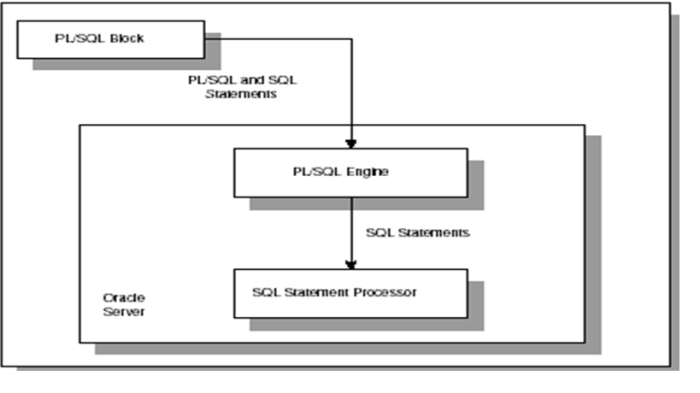
PL / SQL Blocks
- PL/SQL blocks can be divided into two groups:
1.Named
2.Anonymous.
- Named blocks are used when creating subroutines. These subroutines are procedures, functions, and packages.
- The subroutines can be stored in the database and referenced by their names later on.
- In addition, subroutines can be defined within the anonymous PL/SQL block.
- Anonymous PL/SQL blocks do not have names. As a result, they cannot be stored in the database and referenced later
- PL/SQL blocks contain three sections
- Declaration Section
- Executable Section
- Exception Section
- The executable section is the only mandatory section of the block.Both the declaration and exception-handling sections are optional.
PLSQL Block Structure
PL/SQL block has the following structure:
DECLARE
Declaration statements
BEGIN
Executable statements
EXCETION
Exception-handling statements
END ;
Declaration Section
The declaration section is the first section of the PL/SQL block. It contains definitions of PL/SQL identifiers such as variables, constants, cursors and so on.
Example
DECLARE
v_first_name VARCHAR2(35) ;
v_last_name VARCHAR2(35) ;
v_counter NUMBER := 0 ;
Executable Section
- The executable section is the next section of the PL/SQL block.
- This section contains executable statements that allow you to manipulate the variables that have been declared in the declaration section.
Example
BEGIN
SELECT first_name, last_name INTO v_first_name, v_last_name
FROM student WHERE student_id = 123 ;
DBMS_OUTPUT.PUT_LINE
(‘Student name :’ || v_first_name ||‘ ’|| v_last_name);
END;
Exception Handling Section
- The exception-handling section is the last section of the PL/SQL block.
- This section contains statements that are executed when a runtime error occurs within a block.
- Runtime errors occur while the program is running and cannot be detected by the PL/SQL compiler.
EXCEPTION
WHEN NO_DATA_FOUND THEN
DBMS_OUTPUT.PUT_LINE
(‘ There is no student with student id 123 ’);
END;
PL SQL Block Example
DECLARE
v_first_name VARCHAR2(35);
v_last_name VARCHAR2(35);
BEGIN
SELECT first_name, last_name
INTO v_first_name, v_last_name
FROM student
WHERE student_id = 123;
DBMS_OUTPUT.PUT_LINE
(‘Student name: ‘||v_first_name||’ ‘||v_last_name);
EXCEPTION
WHEN NO_DATA_FOUND THEN
DBMS_OUTPUT.PUT_LINE
(‘There is no student with student id 123’);
END;/
PL SQL variables
- Scalar (char, varchar2, number, date, etc)
- Composite (%rowtype)
- LOB (large objects)
- Variable Naming Convention
- Two variables can have the same name if they are in different blocks (bad idea)
- The variable name should not be the same as any table column names used in the block.
%TYPE & %ROWTYPE
%TYPE is used to declare a field with the same type as that of a specified table’s column
DECLARE
v_EmpName emp.ename%TYPE;
BEGIN
SELECT ename INTO v_EmpName
FROM emp
WHERE ROWNUM = 1;
DBMS_OUTPUT.PUT_LINE(‘Name = ‘ || v_EmpName);
END;/
PLSQL is Strongly Typed
- All variables must be declared before their use.
- The assignment statement: =is not the same as the equality operator=
- All statements end with a ;
Sample Program
Set serveroutput on
DECLARE
v_inv_value number(10,2);
v_price number(8,2) := 10.25;
v_quantity number(8,0) := 400;
BEGIN
v_inv_value := v_price * v_quantity;
dbms_output.put(‘The value is: ‘);
dbms_output.put_line(v_inv_value);
END;
/
Comments in PLSQL
DECLARE
v_salary number(9,2) := 40000;
BEGIN
/* this is a multi-line comment that will be ignored by the pl/sql nterpreter */
v_salary := v_salary * 2; — nice raise
END; — end of program
Common PLSQL String Functions
- CHR(asciivalue)
- ASCII(string)
- LOWER(string)
- SUBSTR(string,start,substrlength)
- LTRIM(string)
- RTRIM(string)
- LPAD(string_to_be_padded, spaces_to_pad, |string_to_pad_with|)
- RPAD(string_to_be_padded, spaces_to_pad, |string_to_pad_with|)
- REPLACE(string, searchstring, replacestring)
- UPPER(string)
- INITCAP(string)
- LENGTH(string)
Loops & Conditional Statements
The LOOP statement is used when you are not sure how many times you want the loop body to execute and you want the loop body to execute at least once.
Syntax:
LOOP
{…statements…}
END LOOP;
NOTE:You can terminate a LOOP statement with either an EXIT statement or when it encounters an EXIT WHEN statement that evaluates to TRUE.
Loops Example
In this LOOP example, the LOOP would terminate when the monthly_value exceeded 4000.
LOOP
monthly_value := daily_value * 31;
EXIT WHEN monthly_value > 4000;
END LOOP;
For Loop
FOR LOOP allows you to execute code repeatedly for a fixed number of times.
Syntax:
FOR loop_counter IN [REVERSE] lowest_number..highest_number
LOOP
{…statements…}
END LOOP;
- loop_counter is the loop counter variable in the FOR LOOP.
- REVERSE is optional. If REVERSE is specified, the LOOP counter will count in reverse.
- lowest_number is the starting value for loop_counter.
- highest_number is the ending value for loop_counter.
- statementsare the statements of code to execute each pass through the FOR LOOP.
- You would use a FOR LOOP when you want to execute the loop body a fixed number of times.Example:FOR Lcntr IN 1..20
LOOP
LCalc := Lcntr * 31;
END LOOP;
This FOR LOOP example will loop 20 times. The counter called Lcntr will start at 1 and end at 20.
Conditional Statements
The IF-THEN-ELSE statement is used to execute code when a condition is TRUE, or execute different code if the condition evaluates to FALSE.
SYNTAX (IF-THEN)
IF condition THEN
{…statements to execute when condition is TRUE…}
END IF;
SYNTAX (IF-THEN-ELSE)
IF condition THEN
{…statements to execute when condition is TRUE…}
ELSE
{…statements to execute when condition is FALSE…}
END IF;
SYNTAX (IF-THEN-ELSIF)
IF condition1 THEN
{…statements to execute when condition1 is TRUE…}
ELSIF condition2 THEN
{…statements to execute when condition2 is TRUE…}
END IF;
SYNTAX (IF-THEN-ELSIF-ELSE)
IF condition1 THEN
{…statements to execute when condition1 is TRUE…}
ELSIF condition2 THEN
{…statements to execute when condition2 is TRUE…}
ELSE
{…statements to execute when both condition1 and condition2 are FALSE…}
END IF;
Conditional Statements Example
CREATE OR REPLACE Function IncomeLevel( name_in IN varchar2 )RETURN varchar2
IS
monthly_value number(6);
ILevel varchar2(20);
cursor c1 is
SELECT monthly_income FROM employees WHERE name = name_in;
BEGIN
open c1;
fetch c1 into monthly_value;
close c1;
IF monthly_value <= 4000 THEN
ILevel := ‘Low Income’;
ELSIF monthly_value > 4000 and monthly_value <= 7000 THEN
ILevel := ‘Avg Income’;
ELSIF monthly_value > 7000 and monthly_value <= 15000 THEN
ILevel := ‘Moderate Income’;
ELSE
ILevel := ‘High Income’;
END IF;
RETURN ILevel;
END;
Cursor
Cursor is a temporary memory area (context area) where Oracle executes SQL statements. Oracle associates every SELECT statement with a cursor to hold the query information in this context area.
An Oracle Cursor = VB recordset = JDBC ResultSet
There are two types of cursors – implicit and explicit cursor.
Implicit cursors are created for every query made in Oracle
Explicit cursor is used for the query that returns more than one row of data. These cursors are explicitly declared in the DECLARE section of the PL/SQL block.
Cursor Attributes
cursorname%ROWCOUNT Rows returned so far
cursorname%FOUND One or more rows retrieved
cursorname%NOTFOUND No rows found
cursorname%ISOPEN Is the cursor open
Declare the cursor
Open the cursor
Fetch a row
Test for end of cursor
Close the cursor
Declare: The cursor is initialized into temporary memory area.
Open: The cursor is opened which is declared, and the temporary memory area is allotted.
Fetch: Cursor which is declared and opened can now retrieve rows from data.
Close: The CLOSE statement disables the cursor, and releases the temporary memory area.
Sample Cursor Program
DECLARE
CURSOR students_cursor IS
SELECT * from students;
v_student students%rowtype
BEGIN
DBMS_OUTPUT.PUT_LINE (‘******************’);
OPEN students_cursor;
FETCH students_cursor into v_student;
WHILE students_cursor%found LOOP
DBMS_OUTPUT.PUT_LINE (v_student.last);
DBMS_OUTPUT.PUT_LINE (v_student.major);
DBMS_OUTPUT.PUT_LINE (‘******************’);
FETCH students_cursor into v_student;
END LOOP;
CLOSE students_cursor;
END;
/
Stored Procedures
- PL/SQL code stored in the database and executed when called by the user.
- Called by procedure name from another PL/SQL block or using EXECUTE from SQLPlus.
For example EXEC SQR(50)
SYNTAX
CREATE [OR REPLACE] PROCEDURE procedure_name
[ (parameter [,parameter]) ]
IS
[declaration_section]
BEGIN
executable_section
[EXCEPTION
exception_section]
END [procedure_name];
There are three types of parameters that can be declared:
IN – The parameter can be referenced by the procedure or function. The value of the parameter can not be overwritten by the procedure or function.
OUT – The parameter can not be referenced by the procedure or function, but the value of the parameter can be overwritten by the procedure or function.
IN OUT – The parameter can be referenced by the procedure or function and the value of the parameter can be overwritten by the procedure or function.
Stored Procedure Example
CREATE OR REPLACE Procedure UpdateCourse ( name_in IN varchar2 )
IS
cnumber number;
cursor c1 is
SELECT course_number FROM courses_tbl WHERE course_name = name_in;
BEGIN
open c1;
fetch c1 into cnumber;
if c1%notfound then cnumber := 9999;
end if;
INSERT INTO student_courses( course_name,course_number )
VALUES( name_in,cnumber );
commit;
close c1;
EXCEPTION
WHEN OTHERS THEN
raise_application_error(-20001,’An error was encountered – ‘||SQLCODE||’ -ERROR- ‘||SQLERRM);
END;
Stored Functions
PL/SQL user defined functions are stored in the database and executed when a function call is made in code: example x := SQUARED(50)
The major difference between a procedure and a function is, a function must always return a value, but a procedure may or may not return a value.
SYNTAX:
CREATE [OR REPLACE] FUNCTION function_name
[ (parameter [,parameter]) ]
RETURN return_datatype IS | AS
[declaration_section]
BEGIN
executable_section
[EXCEPTION
exception_section]
END [function_name];
Return Type: The header section defines the return type of the function. The return datatype can be any of the oracle datatype like varchar, number etc.
The execution and exception section both should return a value which is of the datatype defined in the header section.
Stored Function Example
CREATE OR REPLACE Function FindCourse( name_in IN varchar2 )RETURN number
IS
cnumber number;
cursor c1 is
SELECT course_number FROM courses_tbl WHERE course_name = name_in;
BEGIN
open c1;
fetch c1 into cnumber;
if c1%notfound then
cnumber := 9999;
end if;
close c1;
RETURN cnumber;
EXCEPTION
WHEN OTHERS THEN
raise_application_error(-20001,’An error was encountered – ‘||SQLCODE||’ -ERROR- ‘||SQLERRM);
END;
PLSQL Packages
PL/SQL packages are schema objects that groups logically related PL/SQL types, variables and subprograms.
A package will have two mandatory parts:
- Package specification
- Package body or definition
Package Specification
The specification is the interface to the package.
It just DECLARES the types, variables, constants, exceptions, cursors, and subprograms that can be referenced from outside the package.
In other words, it contains all information about the content of the package, but excludes the code for the subprograms.
All objects placed in the specification are called publicobjects.
Any subprogram not in the package specification but coded in the package body is called a privateobject.
Example:
CREATE PACKAGE cust_sal AS
PROCEDURE find_sal(c_id customers.id%type);
END cust_sal;
/
Package Body
The package body has the codes for various methods declared in the package specification and other private declarations, which are hidden from code outside the package.
The CREATE PACKAGE BODY Statement is used for creating the package body.
Example
CREATE OR REPLACE PACKAGE BODY cust_sal AS
PROCEDURE find_sal(c_id customers.id%TYPE) IS
c_sal customers.salary%TYPE;
BEGIN
SELECT salary INTO c_sal
FROM customers WHERE id = c_id; dbms_output.put_line(‘Salary: ‘|| c_sal);
END find_sal;
END cust_sal;
/
Triggers
PL/SQL code executed automatically in response to a database event, typically DML.
Like other stored procedures, triggers are stored in the database.
Often used to:
Enforce complex constraints
Trigger related actions
Implement auditing “logs”
Pop a sequence when creating token keys
Triggers do not issue transaction control statements (such as commit). Triggers are part of the SQL transaction that invoked them.
USER_TRIGGERS provides a data dictionary view of triggers.
Triggers Example
CREATE OR REPLACE TRIGGER LOGSTUDENTCHANGES
BEFORE INSERT OR DELETE OR UPDATE of Major ON STUDENTS
FOR EACH ROW
DECLARE
v_ChangeType CHAR(1);
v_sid varchar2(10);
BEGIN
IF INSERTING THEN
V_ChangeType := ‘I’;
v_sid := :new.sid;
ELSIF UPDATING THEN
V_ChangeType := ‘U’;
v_sid := :new.sid;
ELSE
V_ChangeType := ‘D’;
v_sid := :old.sid;
END IF;
INSERT INTO MAJ_AUDIT (change_type, changed_by, timestamp, SID, old_major, new_major) VALUES (v_ChangeType, USER, SYSDATE, v_sid, :old.major, :new.major);
END LOGSTUDENTCHANGES;
Sequences
You can create an auto number field by using sequences. A sequence is an object in Oracle that is used to generate a number sequence. This can be useful when you need to create a unique number to act as a primary key
CREATE SEQUENCE <sequence_name>
|INCREMENT BY <number>|
|START WITH <start_value>|
|MAXVALUE <maximum_value>|NOMAXVALUE|
|MINVALUE <minimum_value>|
|CYCLE|NOCYLE|
|CACHE <number of values>|NOCACHE|
To pop the next sequence use:
SEQUENCENAME.NEXTVAL (CURRVAL shows last pop)
 nudgebyte blog