By the end of this article, you will have clear idea about websphere message queue.We cover-up the requirements behind, design, functionalities, vendors, approaches for the middleware messaging system. At the end, at least you will be able to discover the power of SOA through messaging , agility of enterprises, inter and intra communications among application and third party application. The common algorithm which will make sense across all the messaging vendors.
The intended audiences for this article could be enterprise architects, Developers, integration developer and business analyst.
We will not cover any specific MOM implementation technologies.
Middleware integration technologies ranks 6 for all over the worlds. This is responsible job which is in high demand for big organization.
Syllabus
1.Overview
2.Installation
3.Queue Manager (QM)
4.Queues
5.MQ Client
6.Channel and listener
7.Public subscription
8.Application programming basics
9.Clustering
10.Logging and backup
11.Security
12.Trouble Shooting
Overview
- Messaging requirements
- Problem with heterogeneous system
- Websphere MQ short introduction
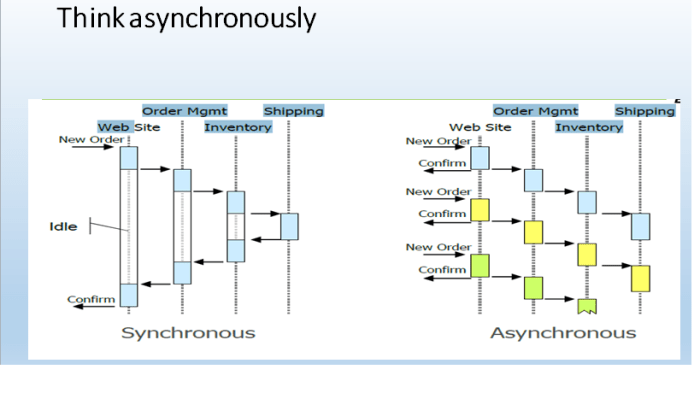
- Synchronized and ashychronised
- Scalability
- High availability
Messaging Requirements
- Different hardware and operating system.
- Different protocol.
- Integration and programming challenges (Non-functional).
- Distributed enterprise applications and databases.
- Mom Standards.
Queuing and messaging concept
- Messaging is method of program to program communication.
- Applications and programs communicate by exchanging messages.
- Messages are placed in message store i.e queue .
- Messaging ignore the integration problems like tight coupling, geographical differences.
Benefits
- Distributed system integration.
- Developers can concentrate business logic only.
- Crash recovery
- Scalability
Major Concrete providers (Vendors)
Message Store
- MQ (IBM)
- Apache Active MQ
Business Orchestration
- Jboss Fuse (Active mq, camel , cfx)
- Oracle Service Bus
- Webmethod
- Sonic ESB
- Amazon SQS
- Mulesoft ESB
- TIBCO
- IBM Integration Bus, Message broker
- Websphere process server
Websphere Message Queue by IBM
- IBM Websphere MQ earlier known as MQSeries.
- Supported by approx. 70 platforms.
- Support both point to point and public-subscriber model of messaging.
- Robust, reliable, scalable and well-proven industry standard solution.
- This is the backbone software widely used along with message broker, integration bus, Websphere process server, etc.
- JMS specification compliant and MQClient are used to interact with Queue.
What is Message
- Message is chunks of bytes wrapped in messaging (information unit) which is used to share data from one system to another system.
- Consist two parts header(knows as MQMD which is used to hold meta data and properties of messages ) and data part.
- Message is to be sent in queue.
- Messages can be upto 100 MB long.
Message Type
- Command Message
- Document Message
- Event Message
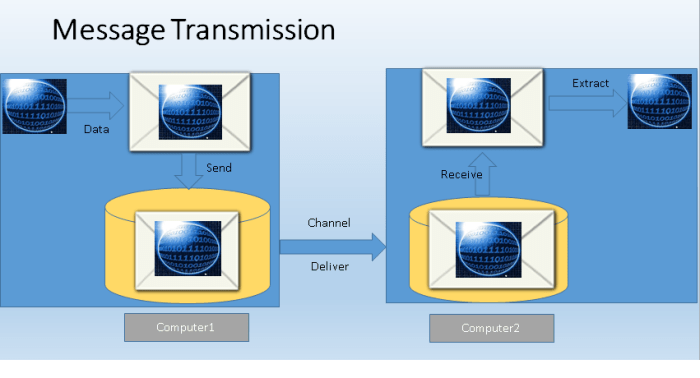
Message Transmission
Messaging Model
1)Point to point
2)Public -subscriber
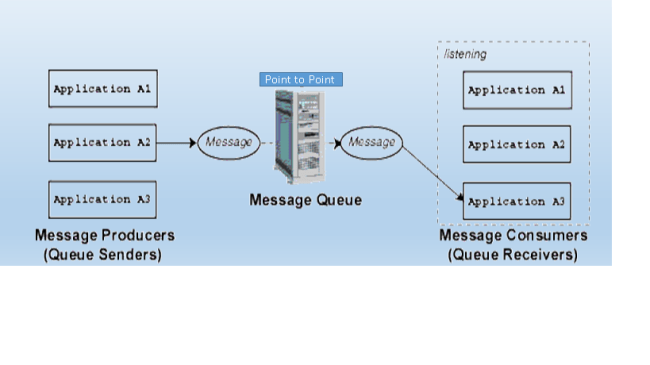
Point to point
Public Subscriber
Queue Manager
- Introduction
- Basic Queue manager commands
- Queue Manager Properties
- Multi- Instance Queue manager
- Queue manager communication
Queue Manager Introduction
- Logical container for queues and MQ objects.
- Applications communicate with QM with the help of either bindings or channel (Within the same server) but with the help of channel for those who hosted outside.
- Need storage for data and logs.
- More than one QM can reside on a server, there is no constraints .
Basic Queue Manger Commands
Command Types
- Control Command :- Invoked by mqm user or the users belong to mqm group.
- MQSC Command :- These are the management commands once queue manager created.
- PCF (Programmable Command Format ):- Used to manage queue manager remotely.
MqExplorer
- This is tool comes with MQ installation and used to administer remotely or locally.
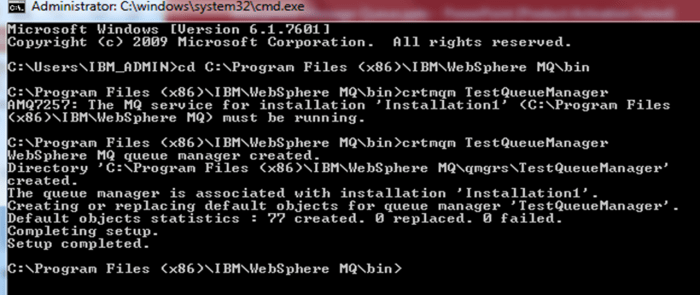
To create Queue Manager
crtmqm TestQueueManager
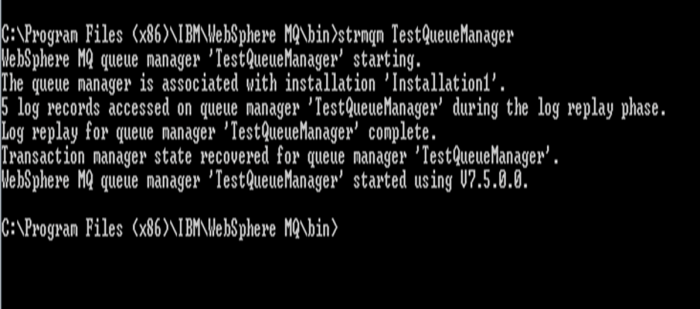
To start a queue manager
strmqm TestQueueManager
To create Queue Manager
endmqm TestQueueManager
Switch option
-c :- to stop in controlled manner, means no new connection will be available.
-I :- Immediate shutdown, means incomplete unit of work or currently going on unit of work rolled back at restart.
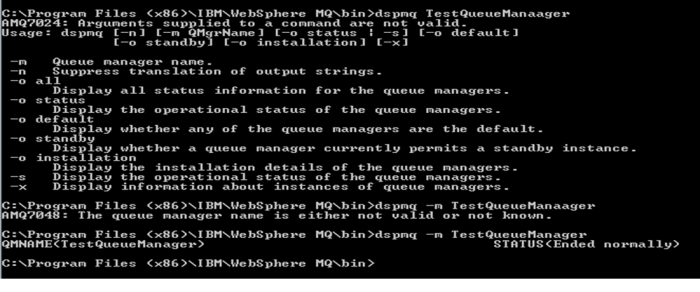
Showing QM Status
QM status are followings :-
- Starting
- Running
- Quiencing
- Ending immediately / normally
Queues
Followings are the types of queues
- Local Queue
- Transmission Queue
- Initiation Queue
- DLQ (Dead letter queue)
- System default queue
- System command queue
- Remote Queue
- Alias Queue
- Model Queue
Properties:
Persistances
- Default Persistant:- This could be Non-persistence and persistence.
- Messages having non-persistence is high performance because it occupies memory and lost in case of queue manager crash.
- Pesistance message takes disk space as this need data to be written into disk .
- Use persistence for critical messages.
Priority
- Default priority :- zero is the default priority which is lowest. This is used to priorities the messages . But the application putting messages into queue will override this property.
- Priority could be 0 to 9. Messages having same priority level are delivered in FIFO.
MQSC Command
Create Local Queue
- define qlocal(TestQM.Input.Queue)
Alter queue
- define qlocal(TestQM.Input.Queue) put (enabled) replace
Delete queue
- delete qlocal(TestQM.Input.Queue)

Transmission Queue
- This is one of the type of local queue .
- This is used to send messages to the remote queue manager’s queue.
- This type of queue hold messages till the delivery to the remote queue manager’s queue.
MQSC Commands
Create Transmission queue
- define qlocal(TestQM.transmission) usage(xmitq)
Delete transmission queue
- delete qlocal(TestQM.transmission)
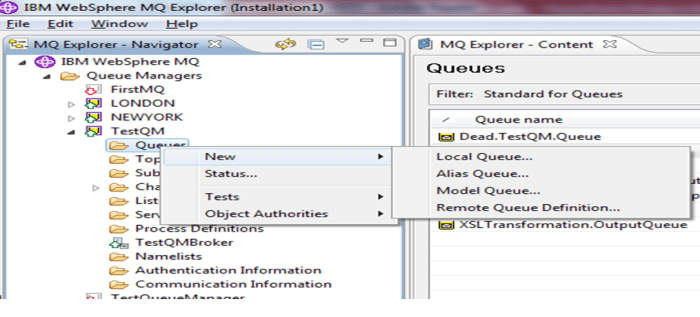
Alias Queue
- Alias queue does not have storage capabilities but it only point to the local queue.
- When client put message to the alias queue, then it goes to the local queue.
- This is just like the view in database.
- One local queue can have more than one alias queue.
- Alias queue is used at gateway for security purposes.
Model Queue
- A model queue is the template for dynamically queues.
- When client put message to the model queue then it creates a local queue at runtime (dynamically) with the attributes of model queue.
- This could be temporary or permanent.
MQ Client
- Client is used to connect with queue manager over the network.
- Client and server can run on different operating system platform.
Programming language support
- Java
- Cobol
- C
- .net
- C++
MQ Client connection using JMS
- MQSeries provies messaging middleware specification using JMS.
- JMS is specification provided by JAVA. WMQ give option to connection with Queue manger in portable fashion.
Sample code to connect to queue manager
import java.io.BufferedReader;
import java.io.File;
import java.io.FileReader;
import java.io.Reader;
import javax.jms.JMSException;
import javax.jms.Session;
import com.ibm.jms.JMSMessage;
import com.ibm.jms.JMSTextMessage;
import com.ibm.mq.jms.JMSC;
import com.ibm.mq.jms.MQConnectionFactory;
import com.ibm.mq.jms.MQQueue;
import com.ibm.mq.jms.MQQueueConnection;
import com.ibm.mq.jms.MQQueueConnectionFactory;
import com.ibm.mq.jms.MQQueueReceiver;
import com.ibm.mq.jms.MQQueueSender;
import com.ibm.mq.jms.MQQueueSession;
public class JMSSample {
public static void main(String[] args) {
MQConnectionFactory cf = new MQQueueConnectionFactory();
try{
//Environment Information
cf.setHostName(“localhost”);
cf.setPort(1416);
cf.setQueueManager(“TestQM”);
cf.setChannel(“SYSTEM.DEF.SVRCONN”);
//Connection to the Queue Manager
MQQueueConnection connection = (MQQueueConnection) cf.createConnection();
MQQueueSession session = (MQQueueSession) connection.createQueueSession(false, Session.AUTO_ACKNOWLEDGE);
//Sending Queue
MQQueue queue = (MQQueue) session.createQueue(“queue:///JavaCompute.Transformation.InputQueue”);
MQQueueSender sender = (MQQueueSender) session.createSender(queue);
MQQueue queue_receiver = (MQQueue) session.createQueue(“queue:///JavaCompute.Transformation.OutputQueue”);
MQQueueReceiver receiver = (MQQueueReceiver) session.createReceiver(queue_receiver);
Reader is= new FileReader(new File(“C:\\INFO\\external-traning\\message-broker\\workspace\\test\\helloworld\\HelloWorld\\com\\vedvrat\\order\\add_customer.xml”));
BufferedReader br=new BufferedReader(is);
StringBuilder result=new StringBuilder();
while(true){
String val=br.readLine();
if(null==val)
break;
result.append(val);
}
String str=result.toString();
JMSTextMessage message1=(JMSTextMessage) session.createTextMessage(str);
// Start the connection
connection.start();
sender.send(message1);
System.out.println(“Sent message:\\n” + message1);
/* Thread.sleep(10000);
JMSTextMessage receivedMessage = (JMSTextMessage) receiver.receive(10000);
System.out.println(“\\nReceived message:\\n” + receivedMessage);*/
sender.close();
receiver.close();
session.close();
connection.close();
System.out.println(“\\nSUCCESS\\n”);
}
catch (JMSException jmsex) {
System.out.println(jmsex);
System.out.println(“\\nFAILURE\\n”);
}
Channel
- Channels are the logical path in which messages are travelled through. This is the only way to connect between queue manager or between clients.
- Channel stays in started mode as long as it runs out messages to send or timeout. Setting disconnect interval to 0 makes channel stay active forever.
Channel
1.Message
- Sender (outbound)
- Server (outbound)
- Receiver (Inbound)
- Requester (Inbound)
- Server-connection
- Cluster sender (outbound)
- Cluster receiver (inbound)
2.MQI
- Server connection
- Client connection
Note:- Message channel is used to communicate among queue managers and MQI channel is used to communicate from mqclient to queue manager.
Sender
- Sender channel is used by the QM to send messages to the other QM.
- Sender channel associated with the transmission queue.
- The destination queue manager details must be provided at the time of creation of sender channel.
Server
- Server channel is also used to communicate with queue managers. But receiver server details need not to be provided.
- If receiver details are provided then server channel called fully qualified.
Receiver
- Receiver channel is used by QM to receiver messages. The name of receiver channel should match its associated sender channel name.
Requester
- A requester channel is also used to receive the messages. However, the difference between receiver and requester channel is that requester channel can initiate a connection.
Cluster-Receiver
- Cluster-reciver channel is used by the mq-clustering repository to receiver cluster metadata from cluster member. We also can send messages from this channel.
Server-Connection
- This is used by the mq client to connect with queue manager.
Listeners
- Channels are the logical path in which messages are travelled through. This is the only way to connect between queue manager or between clients.
- Channel stays in started mode as long as it runs out messages to send or timeout. Setting disconnect interval to 0 makes channel stay active forever.
- Listerners are observer(watch guard) of channel
runmqsc <queue-manager name>
define listener <listener-name> control<startonly, qmgr, manual> trptype(TCP) ipaddr<IP> port<port>
display listerner(queue-manager-name)
display lsstatus <listerner-name>
start listener <listerner-name>
stop listener <listerner-name>
delete listerner <listener-name
Channel Pairing
Sender-receiver channel pair
In order to send the messages, sender channel first start the connection and send the message to the receiver channel.
The sender is aware about the receiver details at the time of creation
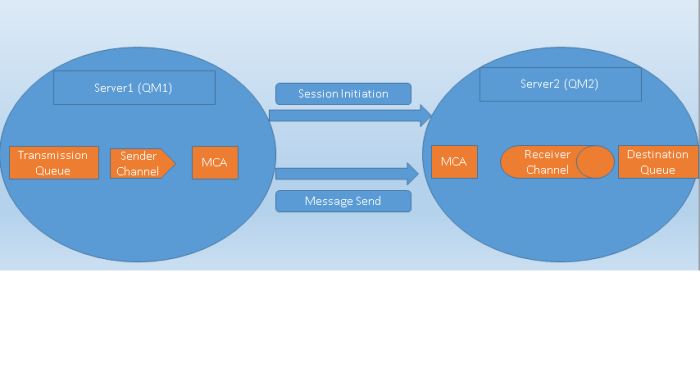
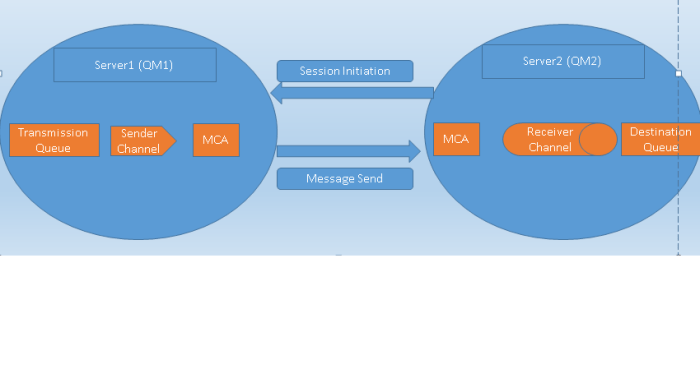
Server-Requester channel pair
The requester server pairing is used when sending system does not aware about the destination location at the channel creation time.
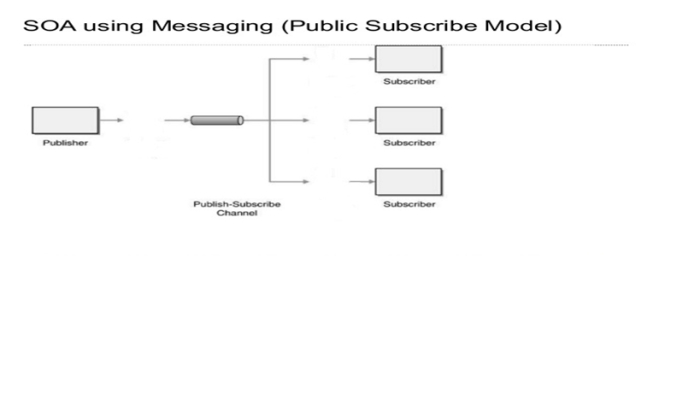
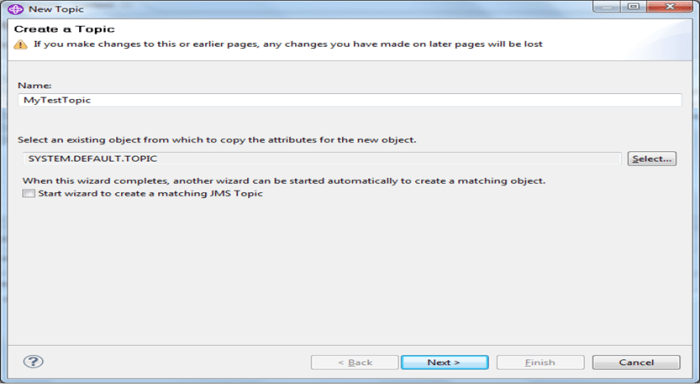
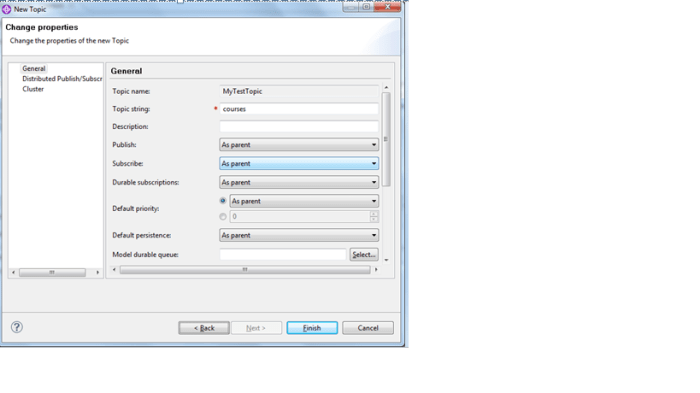
Publish-Subscription
Publish-subscription is a mechanism to send one message to more than one recipients. The recipients are going to be called subscriber and the sender is going to be called subscribers.
 nudgebyte blog