Java 6 SE comes with all the artifacts need to create a web service using JAX-WS . You do not need to have web/application to learn basic webservice provider and consumer.
Below article illustrate this in just 5 simple steps.
E.g –
- JAXWS Toolswsimport and wsgen
- API for Endpoint and light-weight HTTP Server in JDK to deploy our web service.
- JAXB 2.0, also part of
JDK6, for all binding kind of needs. - SAAJ 1.3for message processing also comes with Java 6 SE.
Here we are going to create a HelloWorld web service step by step using Java 6 SE.
Environment Setting.
Create a file classpath.bat inside C:\JAXWSHelloWorld\provider. And set the environment variables.
set JAVA_HOME=C:\Program Files\Java\jdk1.6.0_02;
set path=C:\Program Files\Java\jdk1.6.0_02\bin;
set WSIMPORT_OPTS=”C:\Program Files\Java\jdk1.6.0_02\lib”;
set WSGEN_OPTS=”=C:\Program Files\Java\jdk1.6.0_02\lib”
Implementations
Step -1
Make a directory of your desired location say C:\JAXWSHelloWorld.
Create a java class file in notepad save it into the location C:\JAXWSHelloWorld\provider as HelloWorld.java.
package example;
import javax.jws.WebMethod;
import javax.jws.WebService;
import javax.xml.ws.Endpoint;
/*@WebService annotation which is used to make this class to expose as a web service.
*/
@WebService
public class HelloWorld {
/* This method is the business method marked with @WebMethod. Note, business method must be public in nature.
*/
@WebMethod
public String sayHello(String name) {
return “Hello “+name;
}
public static void main(String[] args){
/* creating and publish an endpoint using java 6 SE.
Endpoint API is being used to deploy this web service in the lightweighted HTTP
container provided by Java 6 SE.
*/
HelloWorld helloWorld = new HelloWorld();
Endpoint endpoint = Endpoint.publish(“http://localhost:8080/helloWorld”, helloWorld); }
}
Step -2
Go to the command prompt
cd C:\JAXWSHelloWorld\provider
Step -3
Run apt to compile and generate required classes
apt -d services example/HelloWorld.java
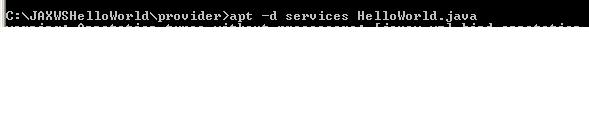
Required classes are generated inside provider folder. Please verify them.
Publish your web service after that
java -cp services example.HelloWorld

Step -4
Open a browser and type
http://localhost:8080/helloWorld?wsdl And see the response as
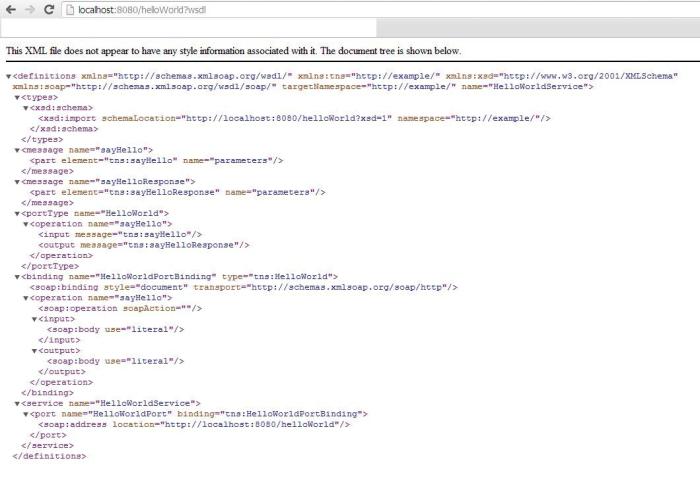
Now , You have published your web services. Time to create web service client now.
Step -5
Make a folder named client inside C:\JAXWSHelloWorld\provider
Run wsimport

Verify that required wrapper classes are created inside client folder.
Create a java clinet inside C:\JAXWSHelloWorld\provider\client\example
package example;
class HelloWorldClient {
public static void main(String args[])
HelloWorldService service = new HelloWorldService();
HelloWorld proxy = service.getHelloWorldPort();
/**
* Invoke the remote method
*/
String name = proxy.add(“India”);
System.out.println(“Web service result is = “+name);
}
}
Compile this client and run
javac -cp . HelloWorldClient.java
and run:
java -cp . example.HelloWorldClient
It will give output as
Web service result is Hello India.
 nudgebyte blog